Flash
Flash the firmware in your browser
Plug the board into a USB port and I'll write the firmware onto it from this page, with nothing to install first.
00 Nightscout display v1.1.10 Release
2026-10-15
Of the three sources this Nightscout display can read, this is the one where you own the server. You give the device your site URL and a read-only token, and it polls your own instance directly.
Nightscout is a project of the Nightscout Foundation. CYGM is an independent project and is not affiliated with, endorsed, sponsored or approved by the Nightscout Foundation.

Tools
Flash
Plug the board into a USB port and I'll write the firmware onto it from this page, with nothing to install first.
Viewer
If a card was fitted, the device wrote every reading to it. Drop that file in and read your night back as a chart, or plug the display in with a USB data cable and read what it is showing right now.
Plenty of cables only carry power, so check yours here before you decide the board is at fault.
I put new firmware in front of a few people before it goes out to everyone, and you're welcome to be one of them.
01 Before you start
I wrote a client, nothing more. It will not deploy Nightscout for you, and it cannot read a site that is not already collecting data.
All you need
A site that is reachable and current
Reachable from the device's network, and already taking entries. The device only reads. It never uploads or repairs anything.
The exact final address
The address that answers directly, not one that redirects to another host. I refuse to follow redirects, and there is a good reason further down.
A readable access token
Made in Admin Tools under Subjects, with the
readable role and nothing more. Not your API secret. Please not
your API secret.
2.4 GHz WiFi
The ESP32 has no 5 GHz radio and no cellular fallback. When your network is down, readings stop until it comes back.
Nightscout is not a CGM in its own right, so the question here is not which sensor you wear. It is whichever sensor your Nightscout setup already handles. By the time the device sees a reading, Nightscout has done the normalising for me.
02 How it reaches your site
There is no session, no login exchange and no refresh cycle here. The device makes plain HTTP GET requests to your site's REST API and parses the answer. That is the whole protocol.
It checks your site's status once when you sign in, to be sure it is talking to Nightscout, then asks about every 90 seconds for the single newest SGV entry and reads the value, its timestamp and its trend arrow.
If you enter a token, I append it to both requests as ?token=, the form
Nightscout's API expects. Leave it blank and the requests go without one, which only
works on a site that allows unauthenticated reads. Tokens are static, so the device
reuses the URL and token until you sign out.
A self-hosted site can hand back almost anything, so a few checks run before a reading is drawn. A value below 20 or above 600 mg/dL is treated as a server artefact and thrown away rather than displayed. An entry with no usable timestamp is rejected, and an entry more than ten minutes old shows as signal loss rather than as a live number.
03 Setup
Open Admin Tools from the hamburger menu.
Under Subjects – People, Devices, etc., add a
subject and name it something you will still recognise in six months, such
as cygm.
Give it the readable role and nothing else. That role can
read entries and cannot write, edit or administer.
Save. Nightscout makes an access token for that subject, a string shaped
like cygm-a1b2c3d4e5f6. Copy it.
Use the access token, not your API secret. The device only issues GET requests, so
a readable token caps what a lost board could do on your site.
Tap the gear, then CGM Settings, then Nightscout.
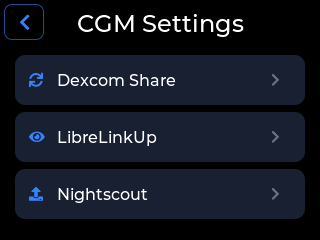
Tap Sign In.
In Server URL, type your site address. Include
https://. Leave the scheme off and the device adds
https:// for you, so the only way to get a plain HTTP connection
is to type http:// yourself. A trailing slash does no harm.
In API Token (optional), paste the access token. There is an eye control beside the field to show you what you typed.
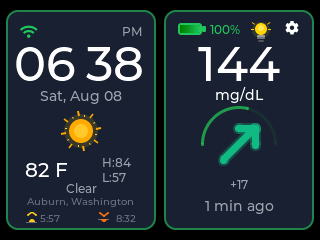
Submit. If it works, the screen reads Connected and shows your site address, with Account Details underneath.
04 Certificates
Because you own the server, you also own its TLS setup. Read this before you decide my firmware is broken.
Every HTTPS connection is verified against a bundled set of public root certificates. There is no way to skip verification and nowhere to install your own root. If your site presents a self-signed certificate, or one from a private authority, the connection fails at the handshake. That is a choice: a 2.8-inch screen cannot ask you a certificate question safely, so it refuses instead of guessing.
A certificate from any of the usual free public authorities is fine, and that is what most internet-facing Nightscout sites already have.
I check certificate validity dates, so TLS cannot succeed until the device has synced its clock. It also means an unsynced clock and an unreachable server look identical from where the device is standing.
If your Nightscout site runs on your own network, you can type an http://
address and the device will use an unencrypted connection. That is the only way to reach
a site with no publicly trusted certificate.
Be clear about the trade. Over plain HTTP your token goes out in the clear and your readings come back in the clear, to anyone on that network. On a home network you control, that is fair. Across the open internet it is not.
If your address answers with a redirect, the device stops and asks for the final address. The reason is your token: following a redirect would re-send it to whatever host the redirect names, and I have no way to judge from the device whether that host should be holding your token.
05 Limits
readable
token is all you need to hand it.06 When it will not connect
| What you see | Most likely cause | What to do |
|---|---|---|
| HTTP 401 | The token is wrong, was revoked, or the subject was deleted. | Make a new readable subject and enter its token. The device signs
itself out the moment it sees a 401 rather than hammering your site. |
Cannot reach the server, over https:// |
A self-signed certificate, an unsynced clock, or a genuinely unreachable address. From where the device sits, all three look the same. | Open the same URL in a browser on another machine first. If the browser warns you about the certificate, there is your answer. |
07 Questions people ask
No, and please do not use one. The device authenticates with an access token
in the query string, and a readable subject token is all it needs.
No. Verification against public roots is mandatory and there is no way to install
your own root on the device. Get a publicly trusted certificate, or use the plain
http:// option on your own network and accept that the traffic is
unencrypted.
Yes, by typing the address with http:// in front of it. I assume
HTTPS for a scheme-less address, so the http:// has to be explicit.
An IP address with a port works, and so does an IPv6 literal in square
brackets.
No. It is stored on the device and sent only to the address you typed in. I refuse redirects precisely so it cannot end up somewhere you did not choose, and signing out clears both the URL and the token.
08 Next step
The firmware is the same whichever data source you use. Assemble the board, flash it from a browser, join it to WiFi, then type in your site URL and token.
If you are not the one running the Nightscout site, the device reads two vendor services directly instead. See how the Dexcom Share setup works with a Follower account, or how the FreeStyle Libre setup works through LibreLinkUp. Either one is less to maintain.
Current firmware v1.1.10 Release · released 2026-10-15
CYGM is an open-source, experimental secondary CGM display. It is not FDA-cleared or FDA-approved, and it has not been clinically validated. It shows readings that have already travelled through your own CGM's app and cloud service, so it can lag, gap or fail independently of them.
Never use it as the sole basis for a treatment decision, and never rely on it as your only alarm. Always confirm on your prescribed CGM receiver or app before dosing or treating.