00 On the nightstand v1.1.10 Release
2026-10-15
A bedside CGM display you can read at 3am
A night glucose display that stays on, dims to a level that doesn't light the room, and sounds a bedside alarm you set up yourself. I built it because I wanted one in my own house.
- 4Alarm tiers
- 28Selectable tones
- 5%Dimmest night level
- $40In parts
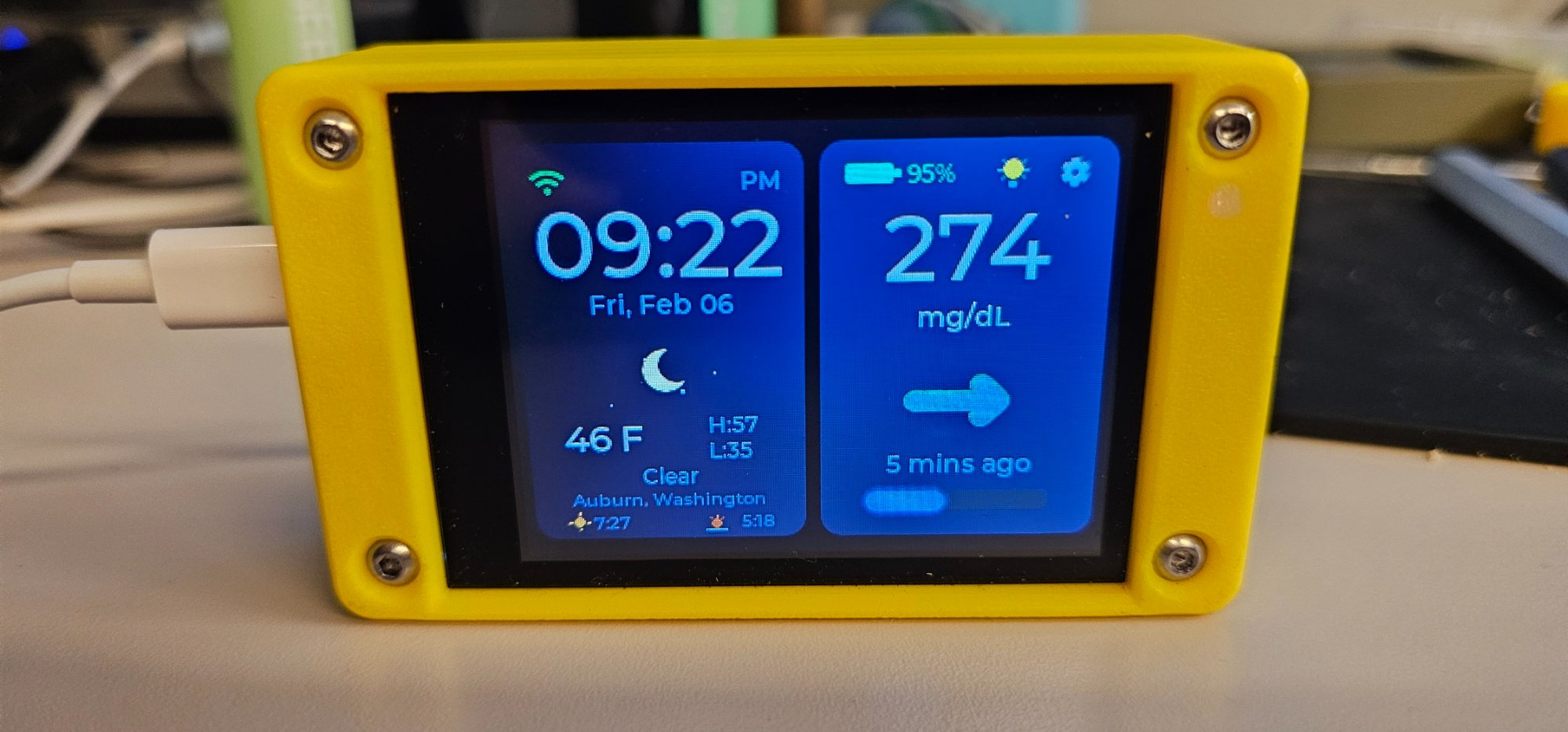
01 The 3am problem
Half awake is a terrible time to go hunting for a phone
The number you want is on a phone that's face down, charging in the other room, or bright enough to end your sleep the second you unlock it. A screen that's already showing the reading skips all of that.
That's the whole case for a bedside unit. It puts a number and a sound in the room where you sleep, and both can fail. The rest of this page is how each part behaves.
02 After dark
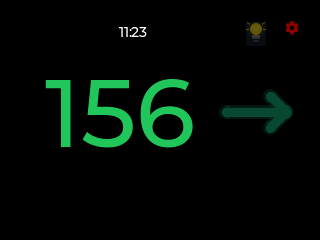
At night the whole screen goes to one number
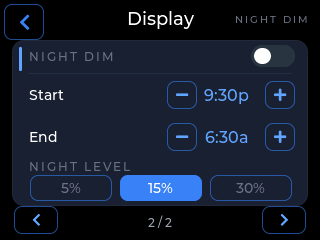
Night Dim is a schedule you set. Inside the window the screen drops to the level you picked and the layout changes.
- You pick a start time and an end time, then a night level of 5%, 15% or 30% brightness.
- Inside that window the display hands itself over to one large glucose number, coloured by zone, with the trend arrow beside it.
- The clock shrinks to a small white readout in the top bar, so at night only one number gets to be big.
- Outside the window your usual layout and brightness come back on their own.
Waking the screen without setting anything off
On battery the screen dims by itself after roughly two minutes without a touch. Waking it takes a double tap anywhere, and the first tap only wakes the screen, so you can't snooze an alarm by accident in the dark.
03 Alarms
Four tiers, and you set each one on its own
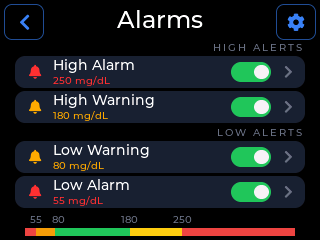
High Alarm, High Warning, Low Warning and Low Alarm. Warnings are the early nudge. Alarms are the ones that mean now.
What you set on each tier
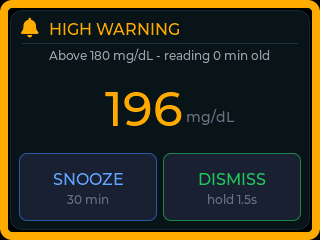
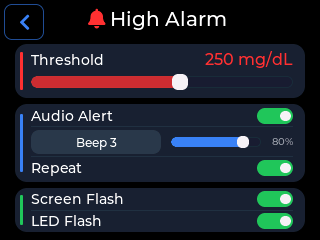
Every tier gets its own threshold. Audio Alert turns sound on for that tier and gives you a tone and a volume. Screen Flash and LED Flash each work on their own if you want a tier that alerts silently. The range bar under the Alarms list shows all four thresholds together, which is the fastest way to spot a gap you didn't mean to leave.
How loud is it, really?
This one I can actually answer, because measuring sound is my day job. I work in live entertainment, where SPL meters are ordinary kit, so I put one on it: with the optional speaker fitted it peaks at 105 dB. That is enough to get anyone's attention.
That figure depends on the speaker. The sound comes from the board's amplified speaker output, so if you built your unit without one there is very little to hear, and Screen Flash and LED Flash are what you've got.
What I still won't tell you is that it will wake you. 105 dB is loud, and a closed door, a fan, earplugs and how deeply one particular person sleeps all sit between that sound and you. Test it yourself, at night, before you treat it as an alarm.
Tones
There are 28 tones, from gentle chimes up to sirens, each with a play button. One, Random (Loud), plays a fresh sequence every time, because a familiar alarm fades into the background after a few weeks. An unanswered alarm also climbs in volume, so you can start it somewhere you can live with.
Quiet hours
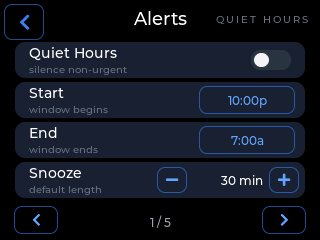
Quiet Hours is a window where non-urgent alerts go visual only: the screen and LED still tell you, the speaker stays quiet. I ship it off by default, because silence is not a sensible default for an alarm you might need.
Answering one
An alarm takes over the whole screen with the value at full size and two buttons. SNOOZE silences it for the snooze length you set in Alert Options, and it fires again if the reading is still out of range when that runs out. DISMISS is a hold, not a tap, so a half-asleep tap is unlikely to clear a real one. The BOOT button on the board snoozes too, and in the dark that's the one you'll actually use.
Repeating, and the three-minute cap
With Keep Sounding off, a tier's tone stops after three minutes while the visual alert stays up and keeps flashing, then sounds again two readings later if the glucose is still out of range.
An urgent low at 55 mg/dL plays at full volume no matter what you've set. It overrides snooze, Quiet Hours and mute, and it ships with Keep Sounding on, so its tone doesn't pause after three minutes the way the other tiers do. There's a switch for it on the Safety Floor page and you can turn it off, but think hard before you do.
04 The honest limit
This is a second alarm, never a first
CYGM is not FDA-cleared or FDA-approved, and it hasn't been clinically validated. It shows readings that have already travelled through your CGM's own app and cloud service, so it can lag, gap or fail independently of them.
It can also fail quietly. If the WiFi drops, the sharing service stalls or the sensor stops reporting, the device has no new number to compare against a threshold, so a threshold alarm has nothing to fire on. Leave your phone's own CGM alarms running overnight. Never make this the only thing standing between a sleeping person and a low.
What catches the silence
The data-gap alert is the one alarm aimed at that failure. It fires when readings stop arriving rather than when a number crosses a line, defaulting to 20 minutes without data, and it names a likely cause: WiFi down, device not signed in, service unreachable, or sensor not reporting. Treat that as a starting point and not a diagnosis.
05 Power overnight
I designed it to be plugged in
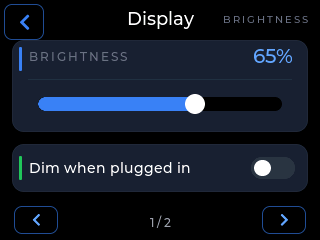
On USB power the screen just stays on. The Dim when plugged in toggle is off by default, and that's the setup I built the device around. Turn it on if you'd rather the screen dimmed while charging.
A LiPo battery is optional. For a bedside unit I'd think of it as insurance against someone kicking the cable out, not as a way to run it untethered all night.
06 Placement
Where you put it matters more than you'd think
-
Angle it away from the pillow
The panel is a 2.8-inch LCD, so it's a light source even at 5%. Turning it slightly away from where a head lies keeps the number readable without parking a lit panel in your line of sight.
-
Keep it within reach
The BOOT button on the board wakes the screen and snoozes an alarm, and half-asleep that's the control you'll really use. Put the unit where a hand lands, not behind a lamp.
07 Questions people ask
Before you build one for the bedroom
Will the alarm actually wake me up?
I can't promise that, and I won't. What I can give you is a measurement. Sound is my trade, and with the optional speaker fitted I've metered this peaking at 105 dB, which is loud by any reasonable standard. Without that speaker there is very little to hear, because the sound comes from the board's amplified speaker output. Whether all that is enough to wake you through a closed door is still yours to test, at night, before you rely on it.
Is the screen too bright to sleep next to?
The dimmest night level is 5% of backlight. The brightness slider responds live as you drag it, so set it by eye in the room itself rather than trusting a number on a page.
What happens if my WiFi drops overnight?
No new readings arrive, so no threshold alarm can fire. The data-gap alert is what covers that: it fires when readings stop arriving, defaulting to a 20-minute window, and it names the likely cause. This is exactly why your phone's own CGM alarms have to stay on.
Do I have to change anything about my CGM?
No. CYGM reads what your CGM already shares to Dexcom Share, LibreLinkUp or Nightscout. Your sensor keeps reporting to the official app exactly as it does now, and you keep using that app.
08 Next step
Start with the CGM you already have
Everything above behaves the same on every unit. What differs is which service the device signs in to for its readings.
-
Dexcom
G6 and G7 through Dexcom Share, using a Follower account so your own receiver keeps working the way it does now.
-
FreeStyle Libre
Libre 2, Libre 3 and Libre 3 Plus through LibreLinkUp, with the sensor still reporting to the phone app.
-
Nightscout
Any sensor your own Nightscout site already handles. Point the device at your URL and it reads from there.
Current firmware v1.1.10 Release · released 2026-10-15
CYGM is an open-source, experimental secondary CGM display. It is not FDA-cleared or FDA-approved, and it has not been clinically validated. It shows readings that have already travelled through your own CGM's app and cloud service, so it can lag, gap or fail independently of them.
Never use it as the sole basis for a treatment decision, and never rely on it as your only alarm. Always confirm on your prescribed CGM receiver or app before dosing or treating.