Flash
Flash the firmware in your browser
Plug the board into a USB port and I'll write the firmware onto it from this page, with nothing to install first.
00 Open-source hardware v1.1.10 Release
2026-10-15
Glucose you can read from across the room. It shows what your CGM already shares, from Dexcom Share, LibreLinkUp or Nightscout.

01 Start here
CYGM doesn't measure anything. It signs in to the sharing service your CGM already publishes to. Pick yours and I'll walk you through it.
G6 and G7, through Dexcom Share. It signs in as a Follower, so your own app is untouched.
Set up a Dexcom display →
Libre 2, Libre 3 and Libre 3 Plus, through LibreLinkUp. Your phone app is untouched.
Set up a Libre display →
Whatever your own Nightscout site handles. Give CYGM your URL and a read-only token.
Set up a Nightscout display →
02 Or start here
Why most people build one, me included. A number you can read at 3am.
Bedside setup →
A follower view on its own screen, so you are not carrying a phone around all evening.
For parents and caregivers →
Three parts, nothing to solder, and the firmware is on GitHub under an MIT licence.
Parts and build guide →
Fit an SD card and it logs every reading. Read the file back in a browser.
What the card viewer does →
03 On the device
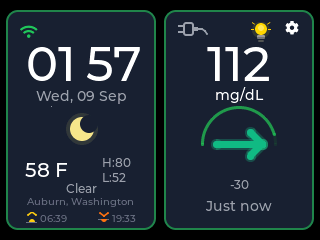
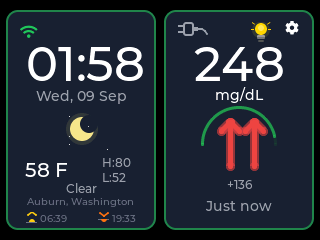
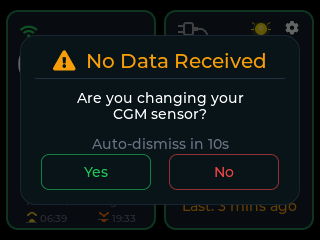
Every shot below came off the panel at its native 320 by 240, running test data. Tap one to see it bigger; the rest are in the gallery.
Swipe for the rest →
04 What it does
05 Privacy
Let's be real here: privacy is a serious matter, and I want to be thoroughly transparent with you about what data comes in, what goes out and what reaches this website. It is very little, and I will explain all of it. The whole source code is public, so you never have to take my word for any of this: read it yourself, any time, on GitHub.
There's no CYGM account and no server of mine holding readings.
The device signs in to the service you chose and keeps those credentials in its own storage. Erase the device and they're gone.
Two things reach this site: the device asks /version.json whether
there's newer firmware, and sends a short heartbeat so I can count running units. The
heartbeat never carries a glucose reading, a credential or a setting. What it
does carry is worth being precise about.
How the device names itself. Firmware up to and including v0.16.3 names the board by its network hardware address: not random, not hashed, and unchanged by an erase. Newer firmware uses a random identifier made on the device instead, and erasing the device throws it away for good: the next start makes a new one, so the old device cannot be recognised again.
What firmware it's running. Firmware newer than v0.16.3 also sends its version number, the same three numbers shown on the device's About screen, so I can see how many devices are on which build. Older firmware doesn't send it.
Where it says it is. Only if you've set a weather location, it also carries your city and coordinates rounded to two decimals, roughly a kilometre, from the centre of a place rather than an address.
The part my server does. Whether or not a city was reported, cygm.me sends the address the heartbeat arrived from to a third-party lookup service, ipwho.is. With no weather location set, that lookup is what places the device on the map. Only the city-level result is kept; the address isn't stored.
Whether the heartbeat is encrypted depends on which firmware the device is running: v0.16.3 and earlier send it in the clear, and later firmware sends it over an encrypted connection that also checks cygm.me is really who answered. A device nobody has updated is still sending it in the clear. The public map shows each reporting city with a count of the devices there, plotted at the same rounded coordinates the device sent. An entry is deleted half an hour after a device last checks in. There is currently no switch to turn the heartbeat off, and erasing the device does not stop it: that clears the identifier, and the next check-in makes a new one.
Everything CYGM contacts.
share2.dexcom.com, shareous1.dexcom.com
or share.dexcom.jp; api.libreview.io or
api.libreview.ru; or your own Nightscout address.api.open-meteo.com,
geocoding-api.open-meteo.com, api.zippopotam.us.pool.ntp.org, time.google.com,
time.nist.gov.cygm.me.ipwho.is, contacted by my server and
never by your device.The hosting company keeps its own access log, which I don't control. It records the heartbeat request line, identifier and coordinates included, against a client address masked to its first three number groups, for about eight weeks.
Two more things before you hand a device to anyone else. Credentials sit unencrypted in the board's flash, the price of keeping the browser flasher working. And erasing clears that internal flash only. It never touches an SD card, so take one out if it's fitted; card logging is on by default whenever a card is present, so there's probably something on it.
06 Why this exists
When my step-daughter was diagnosed with type 1 diabetes, the number we needed most lived on a phone in another room. The screens you could buy were expensive, closed, and usually came with a subscription. So I made the opposite: about $40 in parts, open source, built by someone who needed it in his own house.
It's part of #WeAreNotWaiting: the community of people with diabetes and their families building their own tools. I'm in that community, not selling to it.
More about me and how this gets made, or read what other people have built. There's also the people who helped.
07 Getting started
One display board does nearly all of it. A speaker and a battery are optional, and nothing needs soldering. I'll tell you which board to avoid before you spend anything.
Current firmware v1.1.10 Release · released 2026-10-15
08 Tools
Flash
Plug the board into a USB port and I'll write the firmware onto it from this page, with nothing to install first.
Card viewer
If a card was fitted, the device wrote every reading to it. Drop that file in and read your night back as a chart. Plug the board in over USB instead and the same page shows what it is reading now.
Plenty of cables only carry power, so check yours here before you decide the board is at fault.
I put new firmware in front of a few people before it goes out to everyone, and you're welcome to be one of them.
CYGM is an open-source, experimental secondary CGM display. It is not FDA-cleared or FDA-approved, and it has not been clinically validated. It shows readings that have already travelled through your own CGM's app and cloud service, so it can lag, gap or fail independently of them.
Never use it as the sole basis for a treatment decision, and never rely on it as your only alarm. Always confirm on your prescribed CGM receiver or app before dosing or treating.