Flash
Flash the firmware in your browser
Plug the board into a USB port and I'll write the firmware onto it from this page, with nothing to install first.
00 FreeStyle Libre v1.1.10 Release
2026-10-15
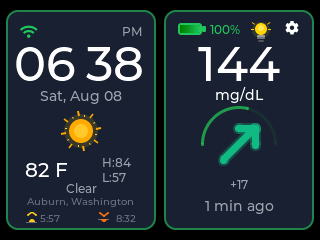
I built this FreeStyle Libre display so I could glance at a number instead of unlocking a phone. It signs in to LibreLinkUp as a follower and shows what your sensor is already sharing, on a screen that stays on.
FreeStyle Libre and LibreLinkUp are trademarks of Abbott. CYGM is an independent project and is not affiliated with, endorsed, sponsored or approved by Abbott.

Tools
Flash
Plug the board into a USB port and I'll write the firmware onto it from this page, with nothing to install first.
Viewer
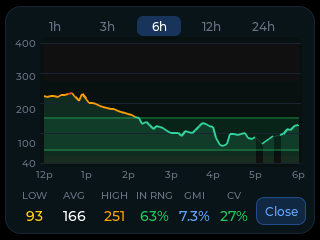
If a card was fitted, the device wrote every reading to it. Drop that file in and read your night back as a chart, or plug the display in with a USB data cable and read what it is showing right now.
Plenty of cables only carry power, so check yours here before you decide the board is at fault.
I put new firmware in front of a few people before it goes out to everyone, and you're welcome to be one of them.
01 Before you buy anything
CYGM reads LibreLinkUp and nothing else. It never talks to the sensor and it never scans NFC.
All you need
| What you have | Does CYGM work | Why |
|---|---|---|
| Libre 2, Libre 3 or Libre 3 Plus with the phone app | Yes | These report into LibreLinkUp, the only thing I read. Libre 2 and Libre 3 are the two I have confirmed on real hardware. |
| A sensor read only with the handheld Libre reader | No | Nothing reaches the cloud, so there is no follower feed to sign in to. |
| A LibreLinkUp account in a different country from the wearer | No | LibreLinkUp accounts are region-bound. The invitation will not resolve across regions, so the connection never appears. |
| An invitation that was sent but never accepted | Not yet | The device asks the service for your patient connections. Until the invitation is accepted, that list comes back empty. |
Open the LibreLinkUp app on a phone. If it is showing a live reading, so will CYGM. If it is not, my device cannot help you, because it reads the same feed through the same account.
02 How the reading reaches the screen
Two accounts are involved and both have to act. That is the part people miss, so here is the whole path in order.
The sensor reports to the FreeStyle Libre app on the wearer's phone. That app is the only thing in the chain that ever touches the sensor.
In the Libre app, under Connected Apps (some versions call it Share), the wearer adds a connection with a name and an email address.
The invited person creates a LibreLinkUp account, verifies it, signs in and accepts the invitation. Only now does a connection exist.
You type that follower account's email and password on the device. It logs in and asks the service for your list of connections.
The connection list carries the latest measurement inline, so one request gets both the value and the arrow. The device uses the first connection.
A check is not the same thing as a new reading. Most checks find the value that was already there, and the age on screen keeps climbing until a new one lands.
This is not a replacement for the phone app. The sensor sends to the phone, the phone sends to the service, and I read the service. If the wearer's phone is off, out of range, or the Libre app is closed, nothing new arrives. The device keeps showing the last value with its age, and stops treating it as current once it is more than ten minutes old.
LibreLinkUp is not one server. Accounts live in regional systems, and the device sorts that out for you. What I cannot fix is a mismatch between the two accounts: if the wearer's account and the follower account were created in different regions, the invitation never resolves and there is nothing for the device to find.
03 Setting it up
Do all of this first, and stop as soon as LibreLinkUp is showing you a live number.
On the wearer's phone, open the FreeStyle Libre app, open the menu and go to Connected Apps. Some versions label it Share.
Under LibreLinkUp, tap Manage or Connect, then Add Connection.
Enter the name and email address of whoever is going to sign in on the device, then tap Add. Following your own sensor? Use your own address.
Open the invitation email, install LibreLinkUp if you do not have it, tap Get Started and accept the licence agreement.
Create the account, verify it from the confirmation email, sign in, and accept the sharing invitation.
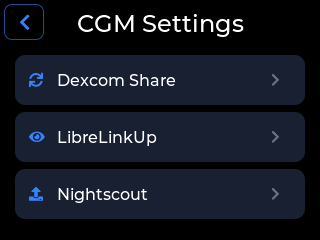
Tap the gear icon, then CGM Settings, then LibreLinkUp.
The screen that opens says Connect your FreeStyle Libre account for glucose readings and carries a Sign In button. Tap it.
Tap the Email field and type the follower account's address. Tap the Password field and type its password. The eye icon shows what you typed.
Tap Sign In. On success the provider screen shows Connected with your email under it, and readings begin arriving. The same screen carries Account Details, which is where Sign Out lives.
Use the follower account's own credentials here, not the wearer's Libre app login. The device is the follower. This is the single most common thing people get wrong.
04 What it does not do
05 When it misbehaves
Almost always, the invitation was never accepted. The device authenticated fine and got an empty connection list back. Open LibreLinkUp on a phone. If you cannot see the wearer there either, go finish the invitation flow first.
I have no workaround for this one. The follower account has to be created in the same country as the wearer's. If it was not, the connection will never appear, no matter how many times you sign in.
06 Questions people ask
Yes, and with Libre 2 and Libre 3 Plus as well. What matters is whether the sensor reports into LibreLinkUp, which all three do through the phone app. Libre 2 and Libre 3 are the two I have confirmed on real hardware.
Yes, permanently. The wearer's phone is what receives from the sensor and what publishes to LibreLinkUp, so I have nothing to read if that phone is off or the Libre app is closed.
No. CYGM signs in as a follower on a separate LibreLinkUp account, the same thing another family member's phone already does. The wearer's app is untouched.
It checks every 90 seconds, but whether a new value exists is up to the Libre system. Most checks find the reading that was already there, which is why the age of the value sits on screen next to it.
No, you need a LibreLinkUp follower account. That is a separate account created from a sharing invitation, and it is the email and password of that account you type on the device.
Into the device's own flash storage and to LibreLinkUp, and nowhere else. There is no CYGM account and no CYGM server holding it.
07 Next step
If LibreLinkUp is already showing you a live number on a phone, the rest is buying one display board and typing an email address into it.
G6 and G7 share through Dexcom Share, which uses a Follower account rather than an invitation and delivers a reading every five minutes.
If your Libre data already lands in your own Nightscout site, point the device at that URL with a read-only token instead.
The follower model is what a parent already uses. This puts it on a screen in the kitchen.
CYGM is an open-source, experimental secondary CGM display. It is not FDA-cleared or FDA-approved, and it has not been clinically validated. It shows readings that have already travelled through your own CGM's app and cloud service, so it can lag, gap or fail independently of them.
Never use it as the sole basis for a treatment decision, and never rely on it as your only alarm. Always confirm on your prescribed CGM receiver or app before dosing or treating.