Flash
Flash the firmware in your browser
Plug the board into a USB port and I'll write the firmware onto it from this page, with nothing to install first.
00 Dexcom Share v1.1.10 Release
2026-10-15
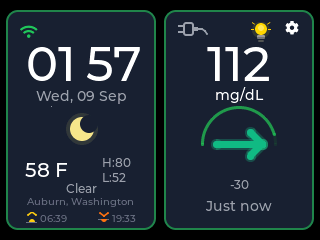
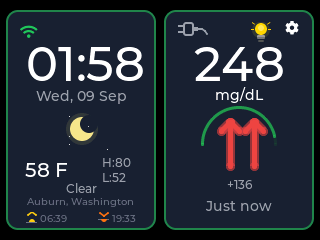
I wanted a cheap Dexcom display I could read from across the room, so I built one. It signs in to Dexcom Share as one more follower and puts your G6 or G7 reading on a 2.8-inch screen that never sleeps.
Dexcom and Dexcom Share are trademarks of Dexcom, Inc. CYGM is an independent project and is not affiliated with, endorsed, sponsored or approved by Dexcom, Inc.

Tools
Flash
Plug the board into a USB port and I'll write the firmware onto it from this page, with nothing to install first.
Viewer
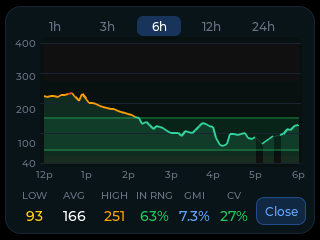
If a card was fitted, the device wrote every reading to it. Drop that file in and read your night back as a chart, or plug the display in with a USB data cable and read what it is showing right now.
Plenty of cables only carry power, so check yours here before you decide the board is at fault.
I put new firmware in front of a few people before it goes out to everyone, and you're welcome to be one of them.
01 Before you buy anything
All you need
A Share-capable sensor
G6 and G7 are what I built and tested against. Other Dexcom systems might work, but I have not tried them.
Share turned on, with a follower
Share has to be on in the Dexcom app, and the account needs at least one follower. With an empty follower list, Share stops publishing altogether.
The account credentials, not a follower's
Sign the device in with the username and password of the account the sensor reports to. The device is the follower. A follower's own login returns no readings, and that trips up more people than anything else.
Any of the three Share regions
Dexcom runs separate Share servers for the US, for outside the US, and for Japan. The device tries them in turn and remembers the one that answered.
2.4 GHz WiFi
The ESP32 has no 5 GHz radio. If your router publishes one name for both bands, the device will find the 2.4 GHz side of it.
A phone that stays in range
Share is uploaded by the Dexcom app, not by the sensor. If that phone wanders off or goes offline, nothing reaches Share and nothing reaches this screen.
02 How the reading gets here
Every hop below already exists in a normal Dexcom Share setup. All I added was one more reader at the end of it.
Your sensor sends to the Dexcom app over Bluetooth. The app uploads to Dexcom's Share service. Followers read from Share. CYGM is just another reader of that stream, so it sees what a follower on their phone sees, no more and no earlier.
Which server it talks to depends on where your account lives, and a wrong guess simply fails to authenticate. So the device probes the regions at sign-in and stores the one that worked. Once it is signed in, it asks Share for the latest value and waits 90 seconds before asking again.
03 Setup
Do the two phone-side checks first. Nearly every failed sign-in anyone has reported to me turned out to be one of them.
Turn Share on in the Dexcom app if it is not already on.
Confirm the account has at least one follower. An empty follower list stops Share publishing, and then there is nothing to read.
Connect to WiFi first. Signing in needs both the network and a synced clock.
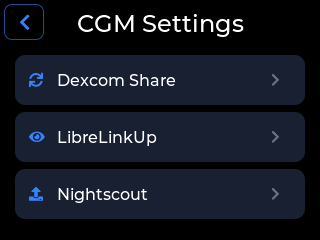
Open the settings gear, then CGM Settings, then Dexcom Share. The screen carries the note Requires Dexcom Share enabled, which is the reminder for step one above.
Tap Sign In.
Tap the Username field and type the username you use for the Dexcom app itself.
Tap the Password field and type the password. The eye icon shows what you typed. Use it once before you submit.
Tap Sign In again. The device authenticates and starts fetching. There is no region to choose.
Once you are in, the screen shows Connected with the username under it, and an Account Details row with a Sign Out button. Signing out clears the stored credentials off the device.
04 Honestly
05 When it misbehaves
Share will keep serving the last value it has, forever. I will not show a stale number as though it were current, so anything more than ten minutes old is marked as signal loss. That is what you see when the phone wanders out of range of the sensor.
An account that exists in one region simply does not authenticate in the other two, so a wrong password looks exactly like a wrong region: three failures in a row. That is why the eye icon is on the password field. A mistyped character is far more common than a real regional problem.
06 Questions
Yes. G6 and G7 both work, and both reach the device the same way, through Dexcom Share rather than through the sensor itself.
No. Share supports several followers at once and this device is just one more of them. Your app keeps uploading and your existing alerts do not change.
No. Dexcom runs a separate Share server for accounts outside the US and a third arrangement for Japan, and the device handles all three. It probes them at sign-in and remembers which one your account lives on.
At most one fetch cycle behind whatever Share is holding, because the device asks again every ninety seconds. It cannot get ahead of Share, and Share cannot get ahead of the upload from your phone.
On the device itself, in its own flash storage, and nowhere else. There is no CYGM account and no CYGM server holding them. Signing out clears them.
The screen stops updating, and it stops claiming the last reading is current, because anything older than ten minutes gets flagged rather than shown as live. Say it plainly: this will not wake you if your WiFi drops. Keep your phone alarms on.
07 Next step
The build is one display board plus two optional extras. Come back to the setup steps above once it boots.
Not on Dexcom, or running more than one system in the house? Each of the other two services has its own page: set up a FreeStyle Libre display through LibreLinkUp, or point the device at your own Nightscout site.
Current firmware v1.1.10 Release · released 2026-10-15
CYGM is an open-source, experimental secondary CGM display. It is not FDA-cleared or FDA-approved, and it has not been clinically validated. It shows readings that have already travelled through your own CGM's app and cloud service, so it can lag, gap or fail independently of them.
Never use it as the sole basis for a treatment decision, and never rely on it as your only alarm. Always confirm on your prescribed CGM receiver or app before dosing or treating.