CYGM+ prototype · build 2.0.8
Install CYGM+
CYGM+ is the 3.5-inch touch-screen version of CYGM, with a sharper, smoother display. This page puts the current prototype on your unit over USB. From build 2.0.16 on, the unit also updates itself over Wi-Fi.
What you need
- Your CYGM+ unit and a USB cable that carries data, not just power.
- Chrome or Edge on a computer. Phones, Safari and Firefox can't do this.
- No other program using the unit's port (close any serial monitor).
The hardware
- Board: JC3248W535C, a 3.5-inch 480×320 capacitive touch display on an ESP32-S3 (16 MB flash, 8 MB PSRAM) with a built-in battery charger and a mono class-D amplifier.
- Battery: the same 3.7 V 3000 mAh lithium cell the original CYGM uses, on the 2-pin 1.25 mm JST socket marked for the battery. It charges from the USB port; the unit shows a bolt while it charges and a percentage on battery. A full charge ran the prototype for about ten hours at full brightness. Amazon
- Speaker: a 25×40 mm 4 Ω 3 W full-range speaker with a 1.25 mm 2-pin JST lead, on the socket marked for the speaker, for alarms and the spoken weather. It is sold as a pack of five. Amazon
Install
The install button unlocks when the box above is ticked.
In the window that opens: pick the unit's port, tick Erase device, then Install. It takes a few minutes. The screen goes blank, then the unit restarts on its own.
No port in the list? Hold the unit's BOOT button, tap RESET, release BOOT, then try again.
Then
The unit walks you through setup: Wi-Fi, your place, your glucose service (Dexcom, LibreLinkUp or Nightscout), units and alarms. Try these:
- Set up the alarms. Open Settings with the gear at the top right, then Alarms. Tap a tile, change the value with the − and + keys, or tap the number and type it.
- In Settings, Display, switch the home screen to the weather card.
- Tell Carl anything that confuses you or looks wrong. A photo of the screen helps.
Updates
From build 2.0.16 on, the unit updates itself over Wi-Fi. It looks for a new version shortly after it starts and then once a day. To look now, open Settings, System, Update and tap Check now. When a version is ready, hold Install. Keep the unit plugged in: it downloads the update, restarts on its own, and keeps your Wi-Fi, glucose sign-in, settings and alarms.
Installing from this page over USB is different: it erases the unit. A unit on 2.0.15 or older needs one more install from this page before it can update over Wi-Fi.
The Beta versions switch on the Update page lets Check now find beta builds as well. The daily check only offers the regular version.
What it looks like
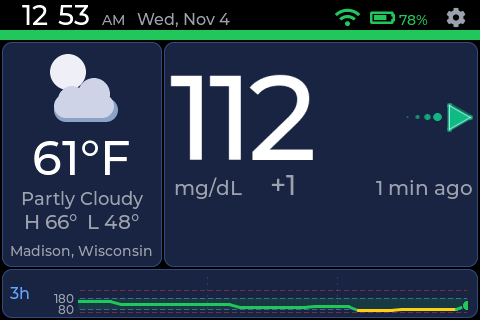 Home, with the weather card.
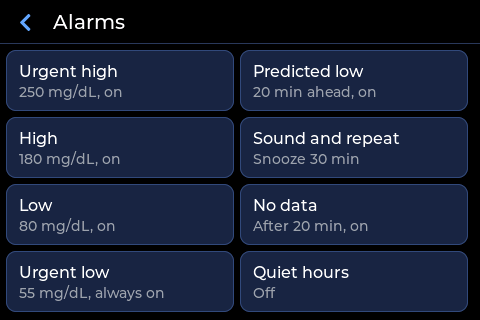 Alarms: one tile per alarm.
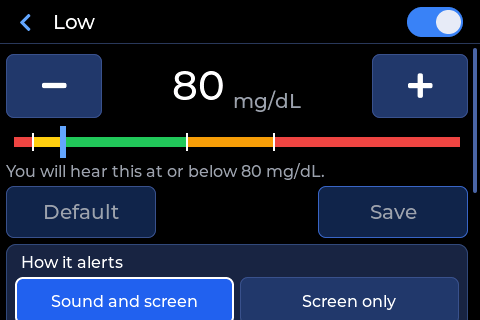 Changing a value.
What the unit sends
Like the main CYGM, a running unit checks in with cygm.me every few minutes so it can appear on the device map. The check-in carries a random device id the unit made up for itself, the firmware version and the device model. If you set a weather place, it also carries that city and its coordinates rounded to about a kilometre. Nothing in it names you, and there is no setting to turn it off. Details are in the privacy page.
Looking for an update is a plain download of a small file from cygm.me, with no device id in it.
Rough edges
- Updates over Wi-Fi are new in 2.0.16. If one fails, the Update page says why and the unit carries on with the version it has. Installing from this page always works.
- The alarm sounds work, but the Test buttons in the alarm settings have only been tried in a simulator.
- Joining a saved Wi-Fi network while connected needs its password typed again.
Manual install with esptool
For another browser or a command line. Files for build 2.0.8:
esptool.py --chip esp32s3 erase_flash
esptool.py --chip esp32s3 write_flash 0x0 bootloader.bin 0x8000 partition-table.bin 0x19000 ota-data.bin 0x20000 cygm-plus-app.bin 0x840000 voice-bank.bin
CYGM+ prototype page.